Apache Flink: Watermarks and Event Time, Why Your Windows Lose Data
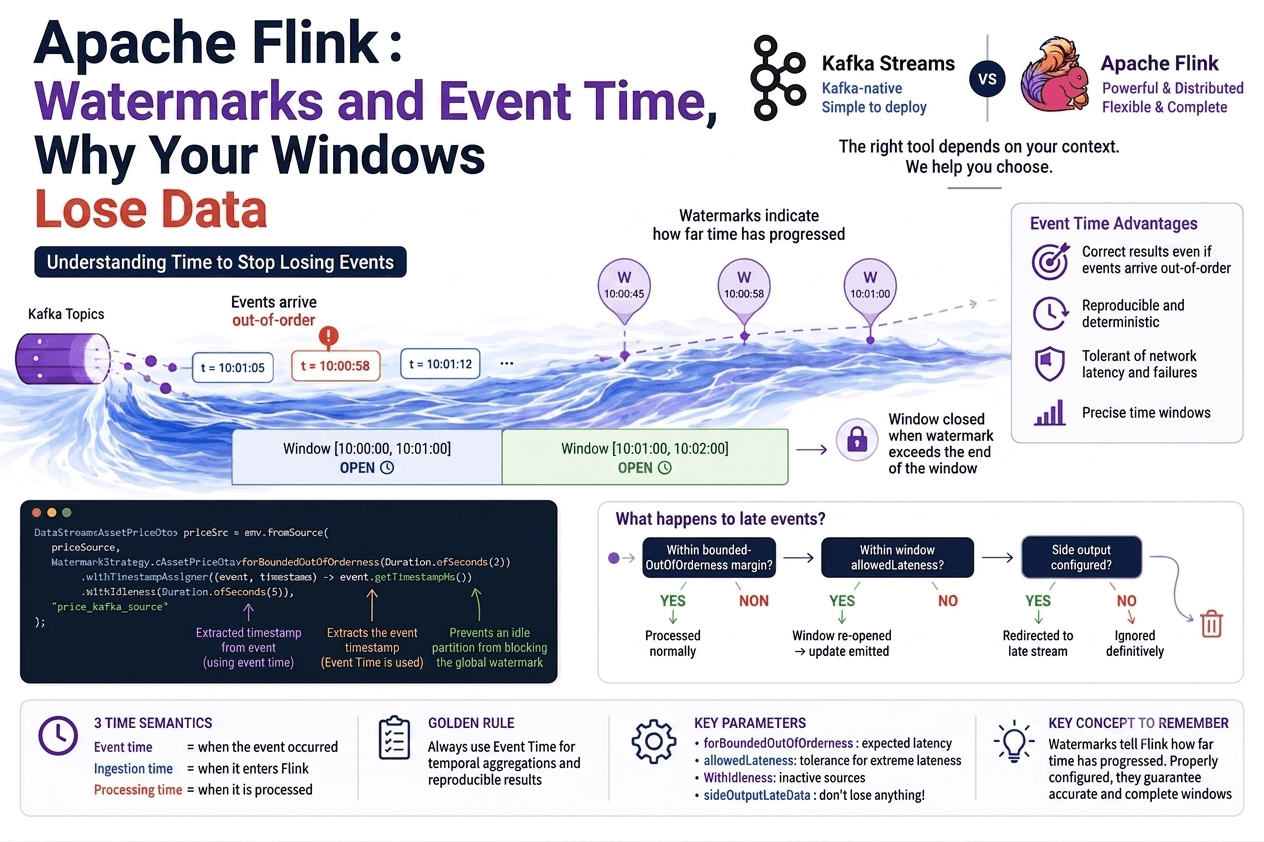
This is the topic that trips up most developers discovering Apache Flink. Not because the concept is complicated, but because it's poorly explained. The official documentation is correct but abstract. Blog articles list parameters without explaining why they exist.
In this article, we'll build intuition from the concrete problem, not from the solution. And we'll anchor it in real production code.
The problem watermarks solve
Imagine a pipeline that calculates the average price of a financial asset per one-minute window. You're using event time, meaning the timestamp of when the price was formed, not when it arrives in Flink.
The window [10:00:00, 10:01:00] must aggregate all events whose timestamp falls within that interval.
The problem: events don't arrive in chronological order. An event with timestamp 10:00:58 can arrive after an event with timestamp 10:01:05, due to network latency, unbalanced Kafka partitions, or mobile workers in offline mode.
Order of arrival in Flink:
t=10:01:05 → arrives first
t=10:00:58 → arrives second  ← belongs to the previous window
t=10:01:12 → arrives third
The impossible question: when should Flink close the window [10:00:00, 10:01:00]? Close too early and you miss events. Wait indefinitely and the window never closes. This is exactly what watermarks solve.
What a watermark is
A watermark is a signal that indicates how far time has progressed in the stream. More precisely:
A watermark W(t) is an assertion: "all events with a timestamp ≤ t have already been seen."
When the watermark passes the end of a window, Flink closes that window and emits its result.
Event stream + watermarks:

[evt t=10:00:30] [evt t=10:00:55] [W(10:00:45)] [evt t=10:01:05] [W(10:00:58)] ...
                                        ↑                                ↑
                               watermark at 10:00:45             watermark at 10:00:58
When the watermark reaches 10:01:00, Flink closes the window [10:00:00, 10:01:00].
The 3 time semantics
Event created        Event enters Flink          Operator processes it
      ↓                       ↓                               ↓
  Event time            Ingestion time                 Processing time
(timestamp in          (Flink clock at               (thread clock at
  the event)            ingestion time)               processing time)
Event time, the timestamp of when the event occurred in the real world. This is the value in your payload (event.getTimestampMs()). It's the only semantic that gives deterministic and reproducible results.
Ingestion time, when the event entered Flink. Simpler to use (no TimestampAssigner needed), but sensitive to ingestion latency.
Processing time, the system time when the operator processes the event. Simple, zero overhead, but non-deterministic: the same pipeline can give different results if you rerun it on the same data.
The production rule: always use event time when aggregating over time windows and reproducibility matters.
The PriceFeedJob code, dissected
Here's a real code excerpt from a financial asset price calculation job:
DataStream<AssetPriceDto> priceSrc = env.fromSource(
    priceSource,
    WatermarkStrategy.<AssetPriceDto>forBoundedOutOfOrderness(Duration.ofSeconds(2))
            .withTimestampAssigner((event, timestamp) -> event.getTimestampMs())
            .withIdleness(Duration.ofSeconds(5)),
    "price_kafka_source"
);
forBoundedOutOfOrderness(Duration.ofSeconds(2))
This is the watermark generation strategy. It tells Flink: "Events can arrive up to 2 seconds late relative to chronological order."
Concretely, the emitted watermark always equals:
watermark = max(observed timestamp) - 2 secondsIf the last seen event has timestamp 10:01:05.000, the emitted watermark will be 10:01:03.000. Flink continues accepting events up to 10:01:03.000 before considering that period closed.
Why 2 seconds? It's a business decision. In an asset price pipeline, 2 seconds covers the typical network latency between exchanges and the Kafka broker. Too short = lost data. Too long = result latency.
.withTimestampAssigner((event, timestamp) -> event.getTimestampMs())
Without this, Flink doesn't know which field of your event contains the timestamp. This lambda tells it: "take the timestampMs field from each AssetPriceDto."
This is the signature that you're in event time, you're extracting the timestamp from the event itself, not from the system clock.
.withIdleness(Duration.ofSeconds(5))
This is a safety net for idle sources. If a Kafka partition receives no events for 5 seconds, Flink marks it as "idle" and stops letting it block the global watermark.
Without this, an empty Kafka partition can indefinitely block the watermark for the entire job, windows never close.
forBoundedOutOfOrderness vs allowedLateness, the most common confusion
These are two distinct mechanisms operating at two different levels. Many people confuse them.
forBoundedOutOfOrderness, at the source level
Delays watermark progression. This is the first line of defense.
Watermark = max(observed timestamp) - boundedOutOfOrdernessallowedLateness, at the window level
Keeps the window open after the watermark has passed it.
stream
    .keyBy(e -> e.getAsset())
    .window(TumblingEventTimeWindows.of(Time.minutes(1)))
    .allowedLateness(Time.seconds(30))  // ← window level
    .aggregate(new PriceAggregator())
The window [10:00:00, 10:01:00] normally closes when the watermark passes 10:01:00. But with allowedLateness(30s), it stays open until the watermark reaches 10:01:30. Late events arriving in this window trigger a new result (an update).
The complete late event processing pipeline
Late event arrives
        ↓
Is it within boundedOutOfOrderness margin?
   YES → watermark hasn't passed it yet → processed normally
   NO  → watermark has passed it →
              Is it within allowedLateness?
              YES → window reopened, processed late → update emitted
              NO  → late data →
                        Side output configured?
                        YES → redirected to side output stream
                        NO  → dropped permanently
Side outputs, never lose data
Events that exceed even allowedLateness are not lost if you configure a side output:
OutputTag<AssetPriceDto> lateTag = new OutputTag<>("late-prices"){};

SingleOutputStreamOperator<AggregatedPrice> result = priceSrc
    .keyBy(e -> e.getAsset())
    .window(TumblingEventTimeWindows.of(Time.minutes(1)))
    .allowedLateness(Time.seconds(30))
    .sideOutputLateData(lateTag)
    .aggregate(new PriceAggregator());

// Separate stream for truly late data
DataStream<AssetPriceDto> lateStream = result.getSideOutput(lateTag);
// → log, alert, or reprocess
This is the most robust production approach: no data is lost, and you know exactly what arrived too late.
The special case: noWatermarks()
In a stateless transformation pipeline, for example a flatMap that generates 2 events from one, there is no time window, nothing to aggregate, nothing to wait for.
DataStream<AssetsExchangeDto> src = env.fromSource(
    exchangeSource,
    WatermarkStrategy.noWatermarks(),  // ← no watermarks
    "exchange_kafka_source"
);
Watermarks only make sense when you need to decide when to close a window. Without a window, they're useless.
Rule: use noWatermarks() for stateless pipelines without temporal aggregation.
What happens when Flink restarts
An often-forgotten point: the watermark is part of the checkpoint.
When Flink restarts after a failure, it restores the watermark to its value at checkpoint time, not to the current time. The job then replays data from the Kafka offset saved in that checkpoint, and the watermark progresses normally.
The risk: if windows should have closed during the restart, they'll close with a delay. This is an inevitable latency spike after a failure.
The mitigation: frequent checkpoints (30s–2min) to minimize replay time, and sufficient allowedLateness to absorb restart latency.
How to choose your parameters
forBoundedOutOfOrderness, how many seconds?
It's empirical. Measure the actual gap between your event timestamps and their arrival time in Kafka. Take the 99th percentile of this gap, add a safety margin.
measured network latency: p99 = 1.2s
safety margin          : +0.8s
→ boundedOutOfOrderness = 2s
Too small: you lose legitimately late events. Too large: your window results arrive with that additional delay.
allowedLateness, how long?
Depends on your tolerance for receiving updates on already-emitted results. If your sink (TimescaleDB, Kafka) supports updates, you can afford a generous allowedLateness. If your sink is immutable (S3, data lake), avoid it or handle corrections downstream.
withIdleness, when to use it?
Whenever you have multiple Kafka partitions and some may be inactive. Without it, a silent partition blocks the global watermark for the entire job.
Next steps
If you've mastered event time and watermarks, you're ready for the advanced topics: state management (Keyed State vs Operator State), checkpointing and fault tolerance, and redistribution strategies between operators.
These topics are covered in the next articles on this blog.