Apache Flink: TaskManagers, Slots and Parallelism, A Clear Explanation
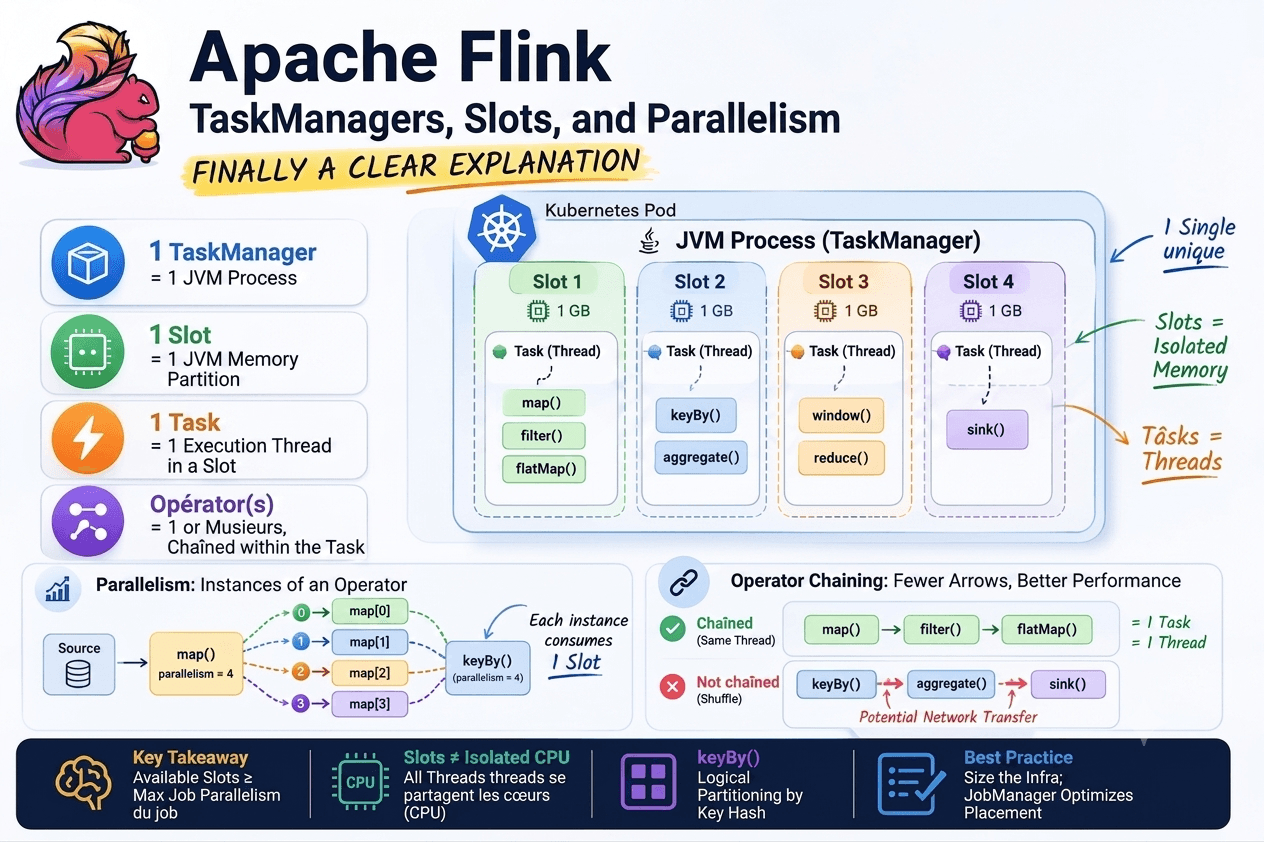
If you've ever tried to understand how Apache Flink actually executes your jobs, you've probably stumbled on three concepts that seem simple on the surface but cause a lot of confusion in practice: the TaskManager, the slot, and parallelism.
The official documentation explains them correctly, but abstractly. In this article, we'll approach them from the bottom up, from the JVM and thread level, so you have a solid understanding, not a memorized one.
TL;DR
TaskManager  = 1 JVM process
Slot         = 1 memory partition of that JVM
Task         = 1 thread executing inside a slot
Operator(s)  = 1 or more, chained inside that task
1. What is a TaskManager, concretely?
A TaskManager is a JVM process. One single process. Not multiple.
When you deploy Flink on Kubernetes, each pod running a TaskManager contains exactly one JVM process. That process is responsible for executing the tasks the JobManager assigns to it.
Kubernetes Pod
└── JVM process (TaskManager)
    ├── Thread 1 → task A
    ├── Thread 2 → task B
    └── Thread 3 → task C
This is important: tasks do not run in separate processes, they run in threads of the same JVM process.
2. A slot is not a thread
This is where most people get it wrong.
A slot is a memory partition of the TaskManager JVM process. If your TaskManager has 4 GB of heap and 4 slots configured, each slot gets 1 GB of managed memory allocated to it.
JVM process - TaskManager (4 GB heap)
├── Slot 1 → 1 GB reserved
├── Slot 2 → 1 GB reserved
├── Slot 3 → 1 GB reserved
└── Slot 4 → 1 GB reserved
What a slot isolates: memory. What a slot does NOT isolate: CPU. All threads share the CPU cores via the JVM/OS scheduler. There is no CPU pinning per slot.
Practical consequence: if you have a CPU-intensive job with many slots on few cores, threads will contend for CPU. Flink cannot prevent this.
3. The full hierarchy
TaskManager  = 1 JVM process
    └── Slot = 1 memory partition
        └── Task = 1 execution thread
            └── Operator(s) = 1 or more, chained in this thread
The key notion here: a task can contain multiple operators. This is what Flink calls operator chaining, an optimization that avoids serialization/deserialization between consecutive operators by fusing them into a single thread.
// These three operators can be fused into a single task
stream
    .map(e -> transform(e))     // operator 1
    .filter(e -> e.isValid())   // operator 2
    .keyBy(e -> e.getKey())     // ← breaks the chain (keyBy = shuffle)
4. Parallelism, what you actually control
The parallelism of an operator defines how many instances of that operator run simultaneously. Each instance runs in a distinct slot.
env.setParallelism(4); // global default

stream
    .map(...).setParallelism(2)       // override to 2
    .keyBy(...)
    .aggregate(...).setParallelism(8) // override to 8
With a parallelism of 4 on a job, the JobManager requests 4 slots from the ResourceManager and distributes them across available TaskManagers. What you don't control: which TaskManager each instance lands on. The JobManager decides placement.
5. Logical vs physical partitioning
When you call keyBy(), you create logical partitioning, not physical like in Kafka.
In Kafka, partitions are physical: they exist on disk, have offsets, retention policies. In Flink, keyBy() creates in-memory routing: each event is redirected to the right operator instance based on its key. It only exists for the duration of processing.
keyBy(event -> event.getAsset())

hash("BTC") % 4 = 0 → instance 1
hash("ETH") % 4 = 1 → instance 2
hash("SOL") % 4 = 0 → instance 1  ← same instance as BTC
The guarantee: a given key always goes to the same instance. This is what enables consistent per-key state.
Important nuance: if both operators are on the same TaskManager, data stays in memory. If they're on different TaskManagers, Flink performs a network transfer, the network shuffle. Transparent to the developer, but with a performance cost.
6. The sizing rule
The only equation that matters:
Available slots ≥ Maximum parallelism of the job

Example:
3 TaskManagers × 4 slots = 12 available slots
Job with parallelism 8   = 8 slots consumed
4 slots remain free for other jobs
On Kubernetes with the Flink Kubernetes Operator, if the cluster doesn't have enough slots, Flink can automatically spawn new TaskManagers to satisfy demand, then release them when the job no longer needs them.
7. Operator chaining, when arrows disappear
In the Flink Web UI (port 8081), you see the job graph with blocks connected by arrows. These arrows represent data transfers between tasks. When there is no arrow between two operators in the same block, Flink has chained them, they run in the same thread, with no network overhead or serialization.
Conditions for chaining to be possible: forward strategy between operators (no keyBy, rebalance, broadcast), identical parallelism, same slot sharing group, and chaining not explicitly disabled via .disableChaining().
8. What this changes in production
"My job is slow, I'll increase parallelism" → Check for data skew first, if one key receives 80% of traffic, increasing parallelism won't help for that key.
"I have lots of slots, my job should be fast" → Slots don't isolate CPU. If you have 16 slots on 4 cores, you have 16 threads competing for 4 cores.
"I want 1 slot = 1 pod for task isolation" → That's not how it works. 1 pod = 1 TaskManager = N slots. Isolation per pod means 1 slot per TaskManager, which is rarely optimal.
"Job parallelism determines the number of TaskManagers" → No. Parallelism expresses a slot need. The number of TaskManagers is an infrastructure decision.
Summary
TaskManager = 1 JVM process. Slot = 1 memory partition of that JVM. Task = 1 thread inside a slot. Operator chain = multiple operators in 1 single thread. Parallelism = number of operator instances = slots consumed. keyBy = logical partitioning by key hash. Arrow in job graph = data transfer between tasks (potential network).
Next steps
If you've understood these concepts, you're ready to tackle the topics that directly depend on them: state management (Keyed State vs Operator State), redistribution strategies (forward, hash, rebalance, broadcast), and fault tolerance via checkpointing.
These topics are covered in the next articles on this blog.